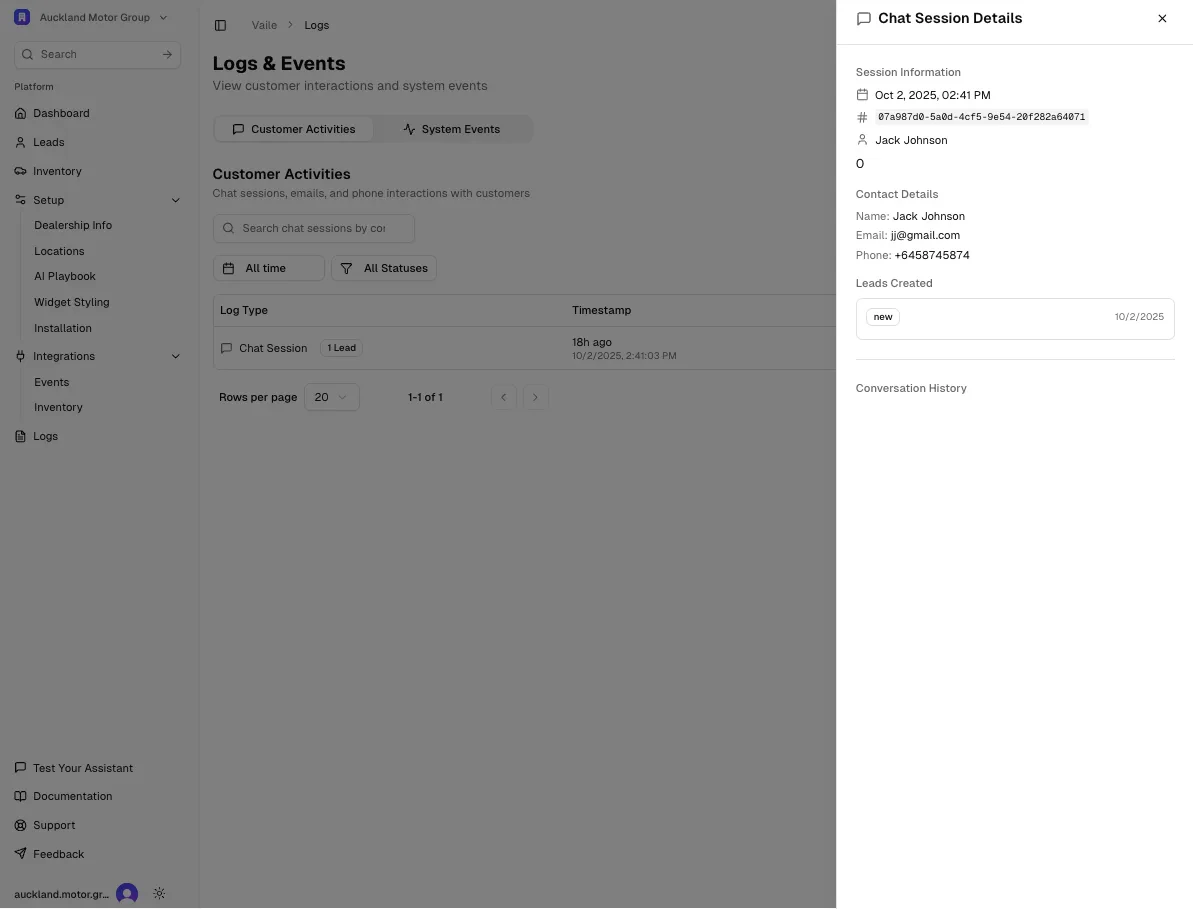
Overview Track all customer interactions through chat sessions, emails, and phone interactions in one central location.
Navigate to Logs in the left-hand menu to view customer activities and system events.
Customer Activities View all customer interactions including:
Chat Sessions - Complete conversation transcriptsEmail interactions - Email exchanges with customersPhone interactions - Phone call logs
Chat Sessions Each chat session shows:
Timestamp - When the conversation occurredLead status - Whether a lead was created from the sessionContact information - Customer name, email, and phone (when provided)
Viewing Session Details Click on any chat session to view:
Session Information:
Date and time of interaction
Session ID
Customer name (if provided)
Contact Details:
Name
Email address
Phone number
Leads Created:
Shows if a new lead was generated from the conversation
Links to the lead record
Conversation History:
Complete transcript of the chat
All messages between customer and AI assistant
Message feedback (thumbs up/down) if provided
Filtering Activities Use the filter options to find specific interactions:
All time - View all historical sessionsAll Statuses - Filter by session status or outcomeSearch - Search by contact name, email, or session details
System Events Switch to the System Events tab to view:
Integration sync logs
System notifications
Error reports
Configuration changes
Review chat sessions regularly to identify common questions and improve your AI Playbook responses.
Privacy & Data Customer conversation data is stored securely and used only for your dealership operations. This data helps you:
Track customer inquiries
Follow up on leads
Improve AI assistant responses
Analyze customer needs