> ## Documentation Index
> Fetch the complete documentation index at: https://docs.vaile.ai/llms.txt
> Use this file to discover all available pages before exploring further.
# Logs & Chat Sessions
> View customer interactions and conversation history
## Overview
Track all customer interactions through chat sessions, emails, and phone interactions in one central location.
Navigate to **Logs** in the left-hand menu to view customer activities and system events.
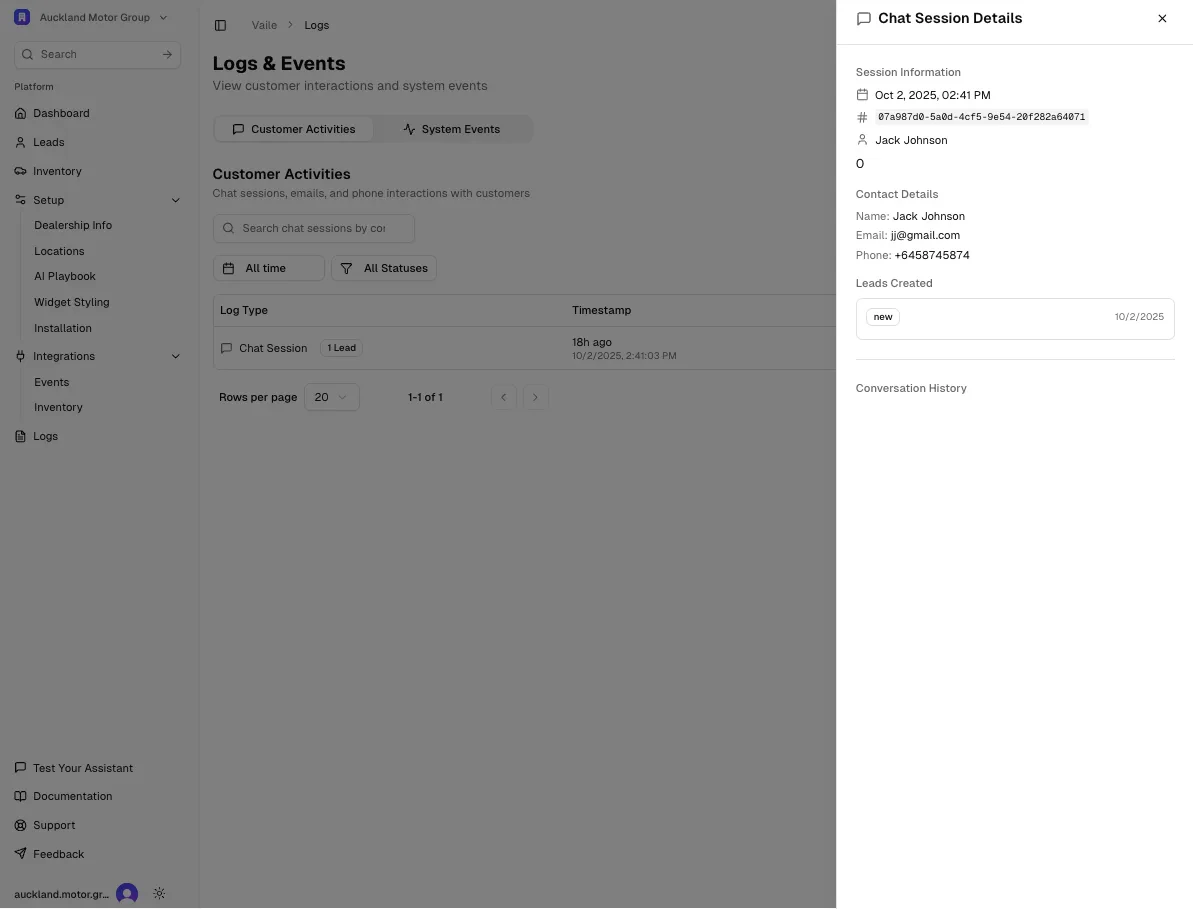 ## Customer Activities
View all customer interactions including:
* **Chat Sessions** - Complete conversation transcripts
* **Email interactions** - Email exchanges with customers
* **Phone interactions** - Phone call logs
### Chat Sessions
Each chat session shows:
* **Timestamp** - When the conversation occurred
* **Lead status** - Whether a lead was created from the session
* **Contact information** - Customer name, email, and phone (when provided)
### Viewing Session Details
Click on any chat session to view:
**Session Information:**
* Date and time of interaction
* Session ID
* Customer name (if provided)
**Contact Details:**
* Name
* Email address
* Phone number
**Leads Created:**
* Shows if a new lead was generated from the conversation
* Links to the lead record
**Conversation History:**
* Complete transcript of the chat
* All messages between customer and AI assistant
* Message feedback (thumbs up/down) if provided
## Filtering Activities
Use the filter options to find specific interactions:
* **All time** - View all historical sessions
* **All Statuses** - Filter by session status or outcome
* **Search** - Search by contact name, email, or session details
## System Events
Switch to the **System Events** tab to view:
* Integration sync logs
* System notifications
* Error reports
* Configuration changes
Review chat sessions regularly to identify common questions and improve your AI Playbook responses.
## Privacy & Data
Customer conversation data is stored securely and used only for your dealership operations. This data helps you:
* Track customer inquiries
* Follow up on leads
* Improve AI assistant responses
* Analyze customer needs
## Customer Activities
View all customer interactions including:
* **Chat Sessions** - Complete conversation transcripts
* **Email interactions** - Email exchanges with customers
* **Phone interactions** - Phone call logs
### Chat Sessions
Each chat session shows:
* **Timestamp** - When the conversation occurred
* **Lead status** - Whether a lead was created from the session
* **Contact information** - Customer name, email, and phone (when provided)
### Viewing Session Details
Click on any chat session to view:
**Session Information:**
* Date and time of interaction
* Session ID
* Customer name (if provided)
**Contact Details:**
* Name
* Email address
* Phone number
**Leads Created:**
* Shows if a new lead was generated from the conversation
* Links to the lead record
**Conversation History:**
* Complete transcript of the chat
* All messages between customer and AI assistant
* Message feedback (thumbs up/down) if provided
## Filtering Activities
Use the filter options to find specific interactions:
* **All time** - View all historical sessions
* **All Statuses** - Filter by session status or outcome
* **Search** - Search by contact name, email, or session details
## System Events
Switch to the **System Events** tab to view:
* Integration sync logs
* System notifications
* Error reports
* Configuration changes
Review chat sessions regularly to identify common questions and improve your AI Playbook responses.
## Privacy & Data
Customer conversation data is stored securely and used only for your dealership operations. This data helps you:
* Track customer inquiries
* Follow up on leads
* Improve AI assistant responses
* Analyze customer needs